field book
field book
V1.1 Live now - download today.
prologue
After reading Ted Nelson's Computer Lib / Dream Machines, I found myself wanting a notes app that didn't yet exist — something leagues beyond what was available. I was tired of the tools I had, always jumping across 5 different notes apps to capture my brain's dumps. I wanted one thing that could be a creative drafting space, a reference library, and a notebook all at once. Over time, that want grew into something larger: a creative everything app.
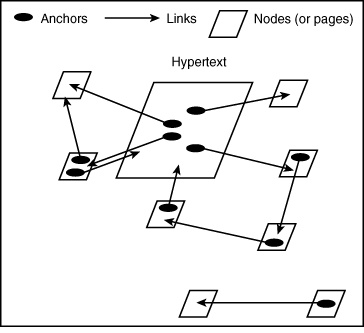
Ted Nelson's hypertext dream was bigger and stranger than the web we ended up with. He coined the word "hypertext" in the 1960s and spent decades chasing it through Project Xanadu — a vision of all human writing woven into a single, deeply interconnected document space.
A few ideas made it radical. Links were meant to be two-way: you'd always know not just where a document pointed, but who pointed back at it, so connections were visible from both ends. Nothing would ever break or disappear — every version of every document preserved, no 404s, no link rot. Instead of copying and pasting, you'd use transclusion: quoting a source meant pulling in the living original by reference, so it stayed connected to where it came from, with attribution intact. And baked into all of it was a payment layer — every time your words were transcluded or quoted, you'd automatically earn a tiny royalty. Authorship and economics were part of the architecture, not an afterthought.
What we got instead was Tim Berners-Lee's World Wide Web — and it won precisely because it was simpler. Links are one-way, so you link out into the void and never know who's linking back. They break constantly; the web forgets. There's no transclusion, just endless copy-paste that severs content from its source and turns attribution into a manual chore. There's no native way to pay creators, which is a big reason the web drifted toward ads, paywalls, and walled platforms — the opposite of Nelson's open, universal fabric. Connections became invisible jumps: you click, you teleport, you lose the context.
The irony is that Nelson's richness is what made Xanadu nearly impossible to ship, while Berners-Lee's "good enough" compromises are exactly what let the web scale. But a lot of what people are reaching for now — backlinks, knowledge graphs, citation-aware tools, things that hold onto where an idea came from — are quiet attempts to win back pieces of the dream the web left on the floor.
Most notes apps retreat into simplicity — not because simplicity serves you better, but because the alternative is hard. Building a system flexible enough to hold many workflows at once, without collapsing into a mess, takes painstaking design work that most teams never commit to. So they ship the lowest common denominator and call it minimalism. Unable to pin down the exact combination of features that would make a notes app feel alive, they settle. And "simple," in practice, tends to mean:
No rich media support
Weak search
No automatic linking between pieces of media
No connection to the tools you already use
And rarely, a UI worth returning to
What I'm building is a different kind of notes app — one designed around immersive media, intelligent use of AI, and the conviction that a tool you touch every day should be a small daily delight. The complexity is the point; the work was in making it feel effortless.
I've been building it slowly for more than three years. It took time, and I won't pretend otherwise. Life got in the way. Sometimes I got in my own way. But I'm proud of what it's become. It's the best app I've ever used.
A special thanks to the many friends whose ideas, designs, and gentle hands have quietly guided this project over the years.
Day 1
It started with something that had nothing to do with an app.
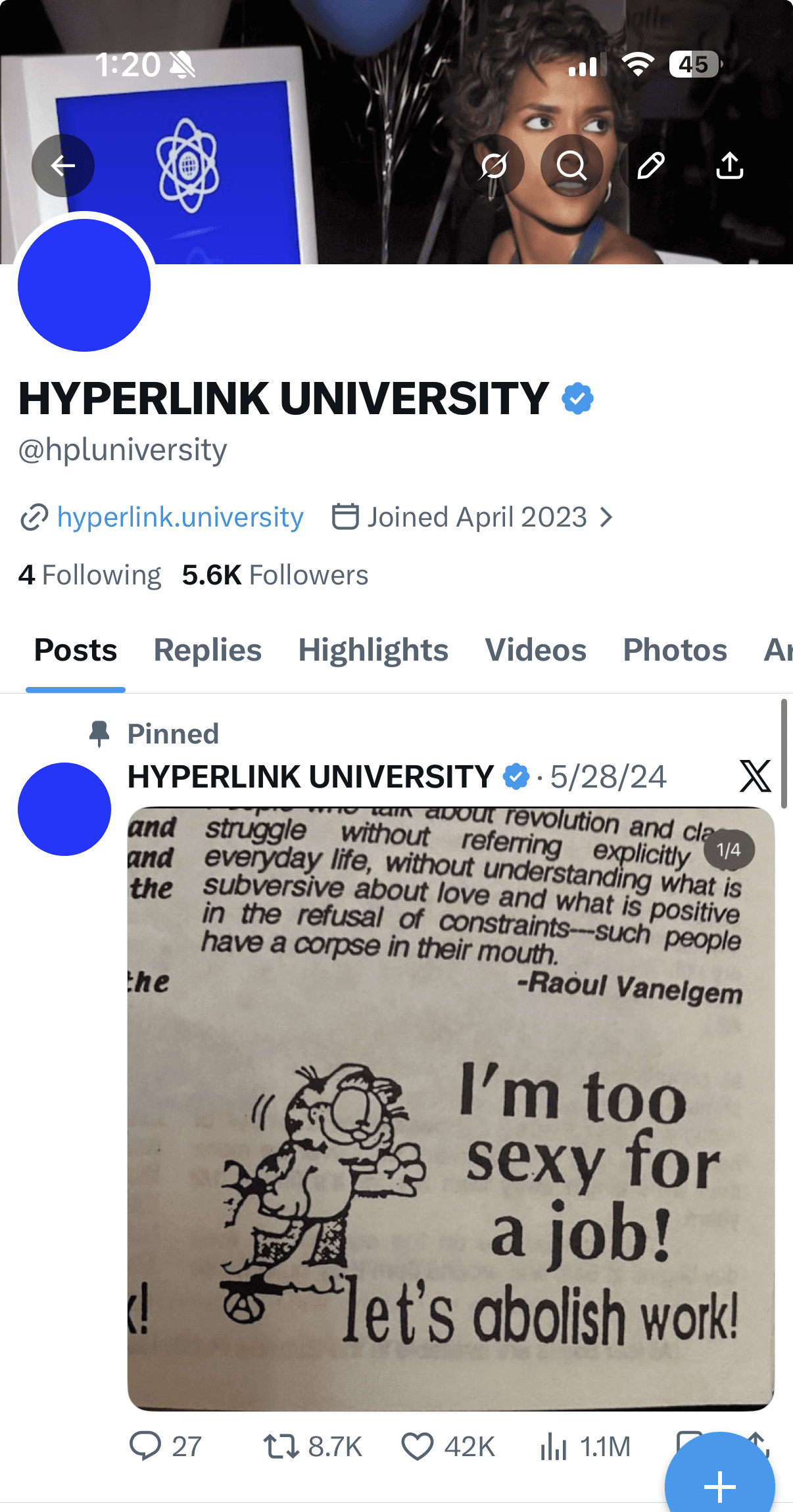
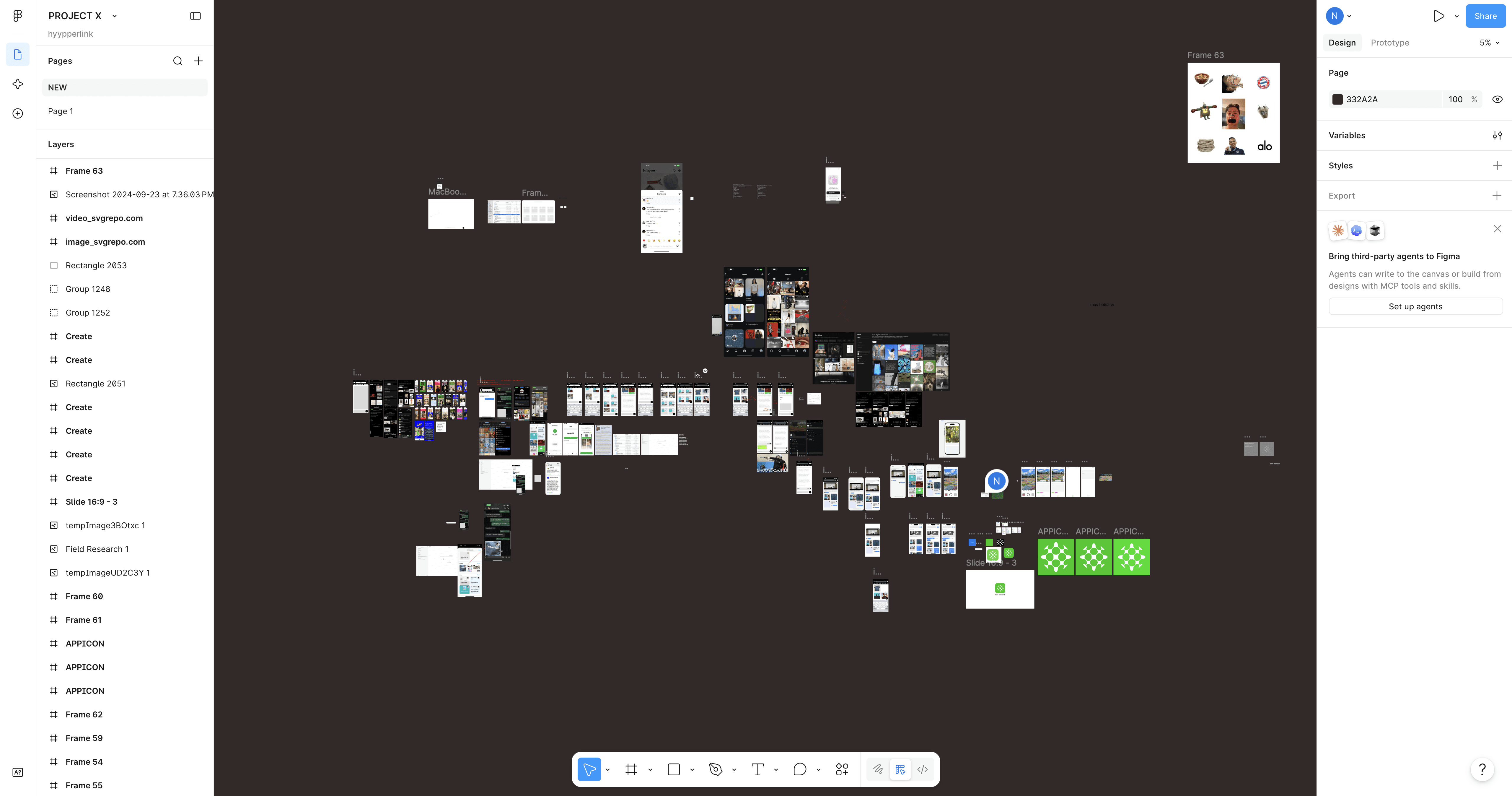
I'd founded a little digital academy called Hyperlink University — HPLU — for kids who wanted to take an active approach to learning. The idea was simple: use the free resources already scattered across the internet, build your own capstones and projects, and you can teach yourself almost anything. The community grew faster than I expected. And the more it grew, the more obvious it became that we needed somewhere to actually talk and share the boundless pile of resources we were all accumulating.
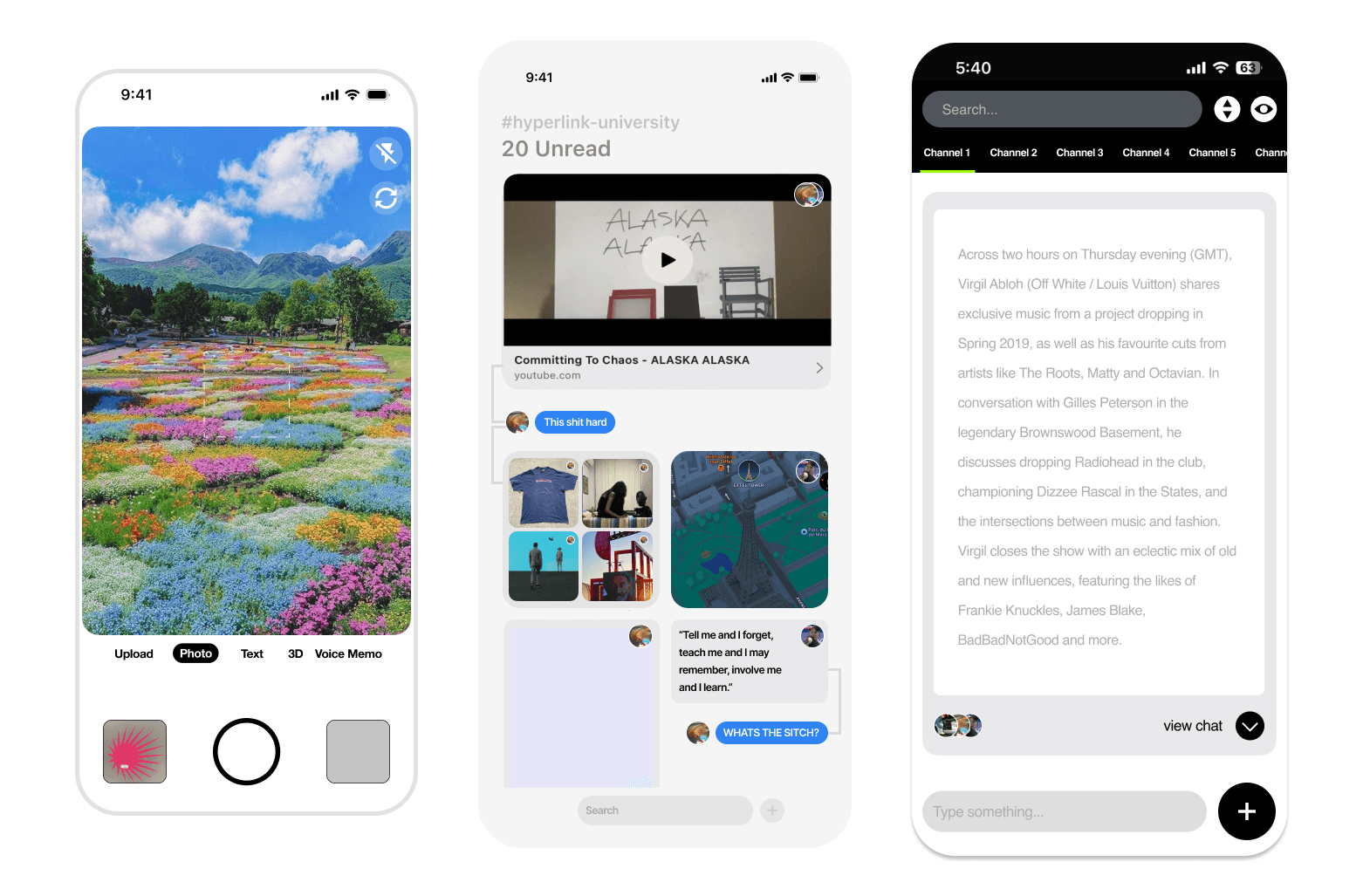
The problem was that link sharing, everywhere, was broken. You'd drop a URL into a chat and it would collapse into a gray rectangle, stripped of everything that made it worth sharing. So the very first version of this app started there — a rich, links-integrated platform where our community could share what they were finding and archiving online.
Then the requests started. Can I post a PDF? What about a video? An image set? A song? One by one we added media types until, eventually, we handled basically everything. And somewhere in that process, a thought struck me that I couldn't put down:
Why couldn't a notes app be social?
I get thousands of notifications on are.na about what my friends are archiving — what they're looking at, collecting, obsessing over. There's something quietly thrilling about it. Of course, some things are meant to be private. But the rest is the digital version of seeing someone at the library. You catch a glimpse of what a friend is deep in, and it sparks a curiosity in you. It makes you a little better at the end of the day.
So we built a prototype to test the feeling — Pixel Park. A simple, open website where anyone could post a link and randomly browse a library of curated media. No accounts, no friction, just a window into what people were saving. It was rough, but the feeling was there. I started dreaming about everyone who could use something like this — educators, researchers, creatives, the kid three states over teaching herself animation at midnight.
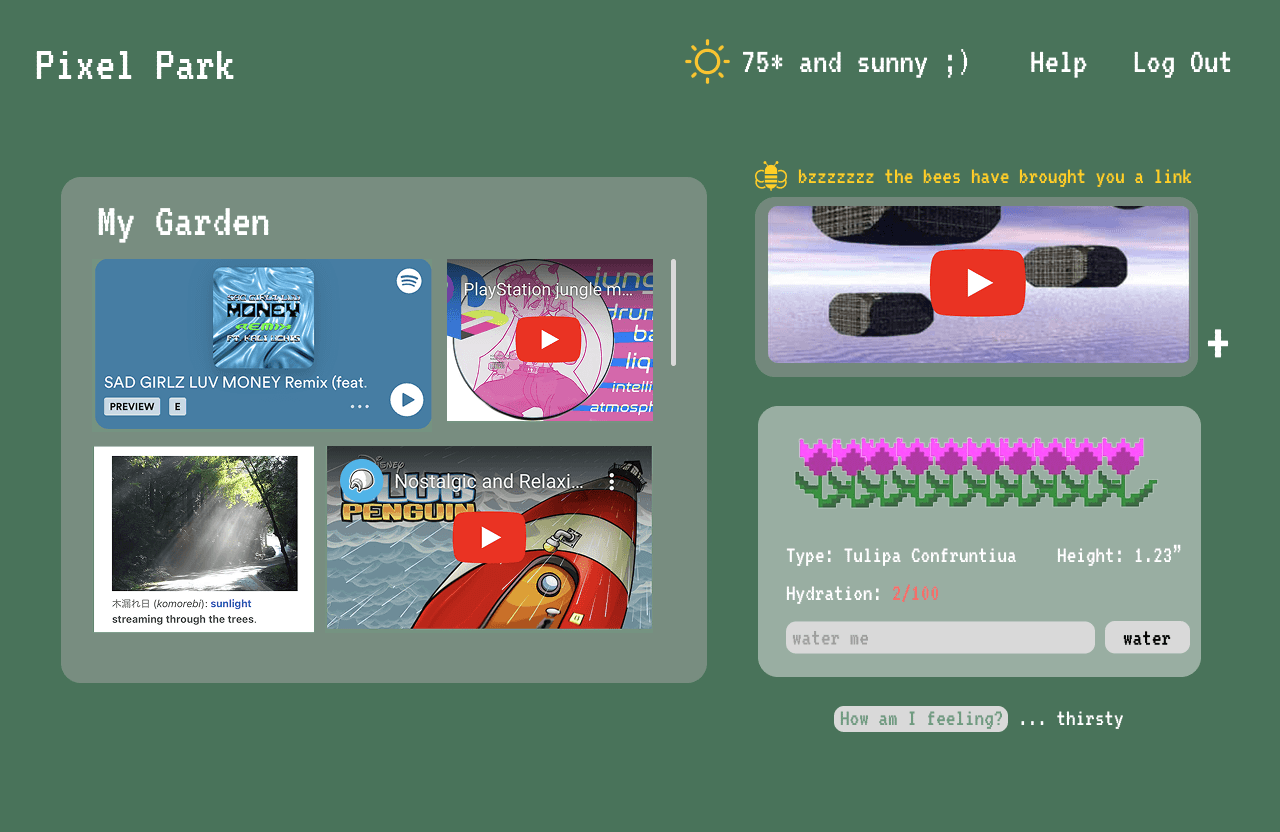

early day scribbles (2024)
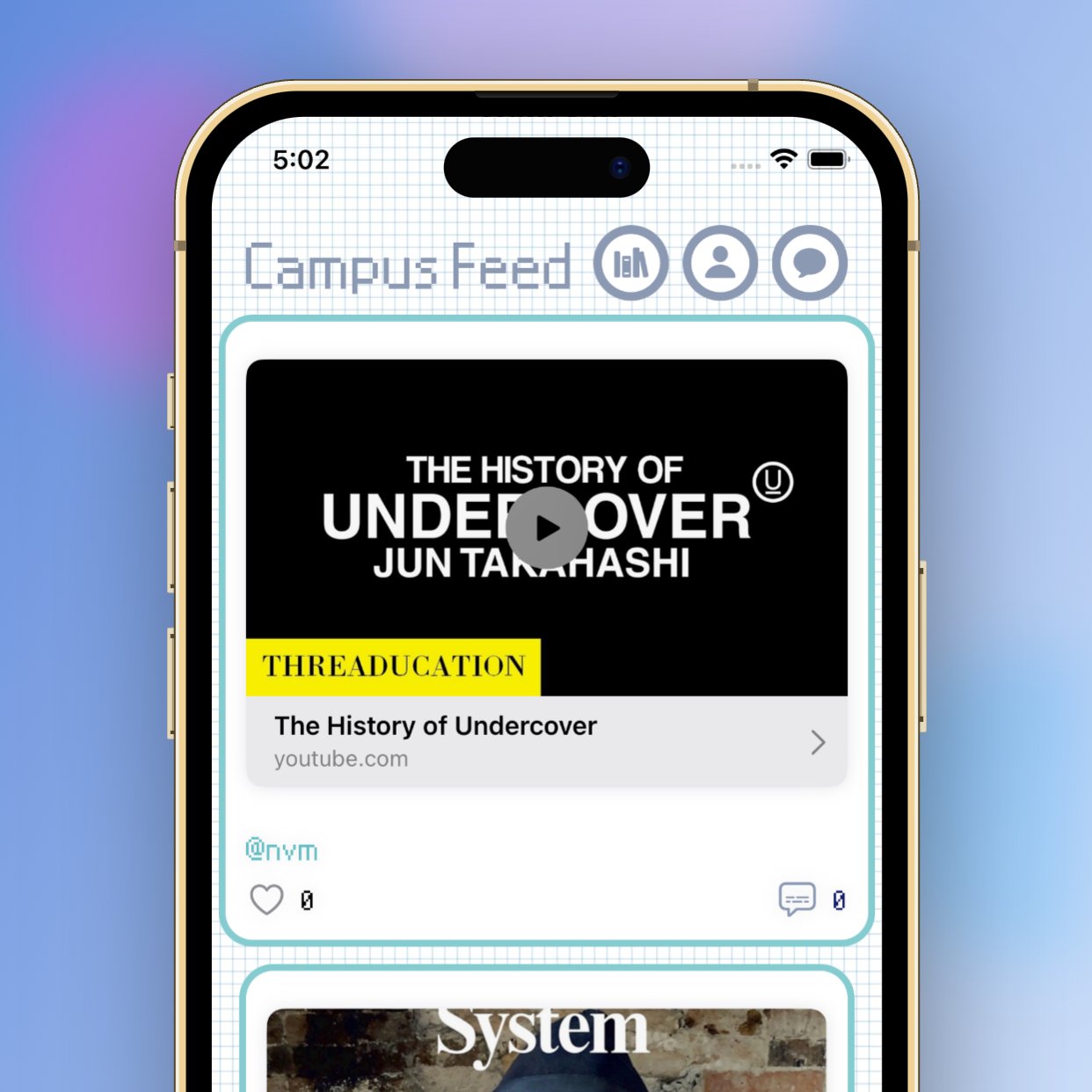
HPLU (2024)
Pixel Park gave us enough conviction to build the real thing. We turned HPLU into a proper app, packed with goodies — including, in the earliest versions, a PictoChat lifted straight out of the Nintendo DS, so people could doodle and chat with each other each day. It was playful. People liked it. For a while it felt like we'd found it.
But the longer I lived inside the app, the more something nagged at me. It was too social. The links, the sharing, the chat — it had all become the main event, and the actual act of saving something for yourself had quietly become a chore you did on the way to posting. That was backwards. I didn't want a social network with a notes app bolted on. I wanted a place to archive my own world, where the social part emerged naturally — as a byproduct of archiving, not a second job stacked on top of it.
That realization was big enough that I decided to start over.
Project X
I named the restart Project X, after Ted Nelson's Project Xanadu — the original dream of hypertext, the one that was supposed to connect everything to everything. It felt right to circle back to where the whole obsession began.
This time the order of operations was inverted. Archiving first. Everything else second.
And then came the long middle — the part nobody writes about, because it's mostly just doing the work. I explored more designs and directions than I can count. Some weeks I'd rebuild a single screen four times over. I taught myself things I had no business learning to teach myself. The app changed shape again and again. Life kept happening in the background — the way it does — and there were long stretches where I barely touched it. I'd come back, look at where I'd left off, and keep building toward the thing I knew it could be.
It took about two and a half years of that. A lot of learning, a lot of starting-over, a lot of nights. But slowly, the everything-app I'd been chasing since that Ted Nelson book started to actually exist.
And it finally had the right name.
field book
I introduce field book - a new way to archive the internet.
"A field book is what a naturalist carries into the wild: a place to press a leaf, sketch a bird, jot a coordinate, note the weather. You record what you encounter as you encounter it, and the sorting and connecting comes later. That's exactly what this is. You go out into the strange wilderness of the internet, you bring back specimens, and field book quietly catalogs them for you."
Hyperworld is a connected digital library for your mind — a place where everything you save, collect, and reference can finally live together and talk to each other. Today your creative inputs are scattered: a Twitter bookmark here, an are.na image there, a screenshot buried in your camera roll, a PDF in some folder you'll never open again. The only place those things actually connect is in your head, or temporarily on a moodboard. Hyperworld is built to capture that connective tissue and make it permanent, searchable, and shared.
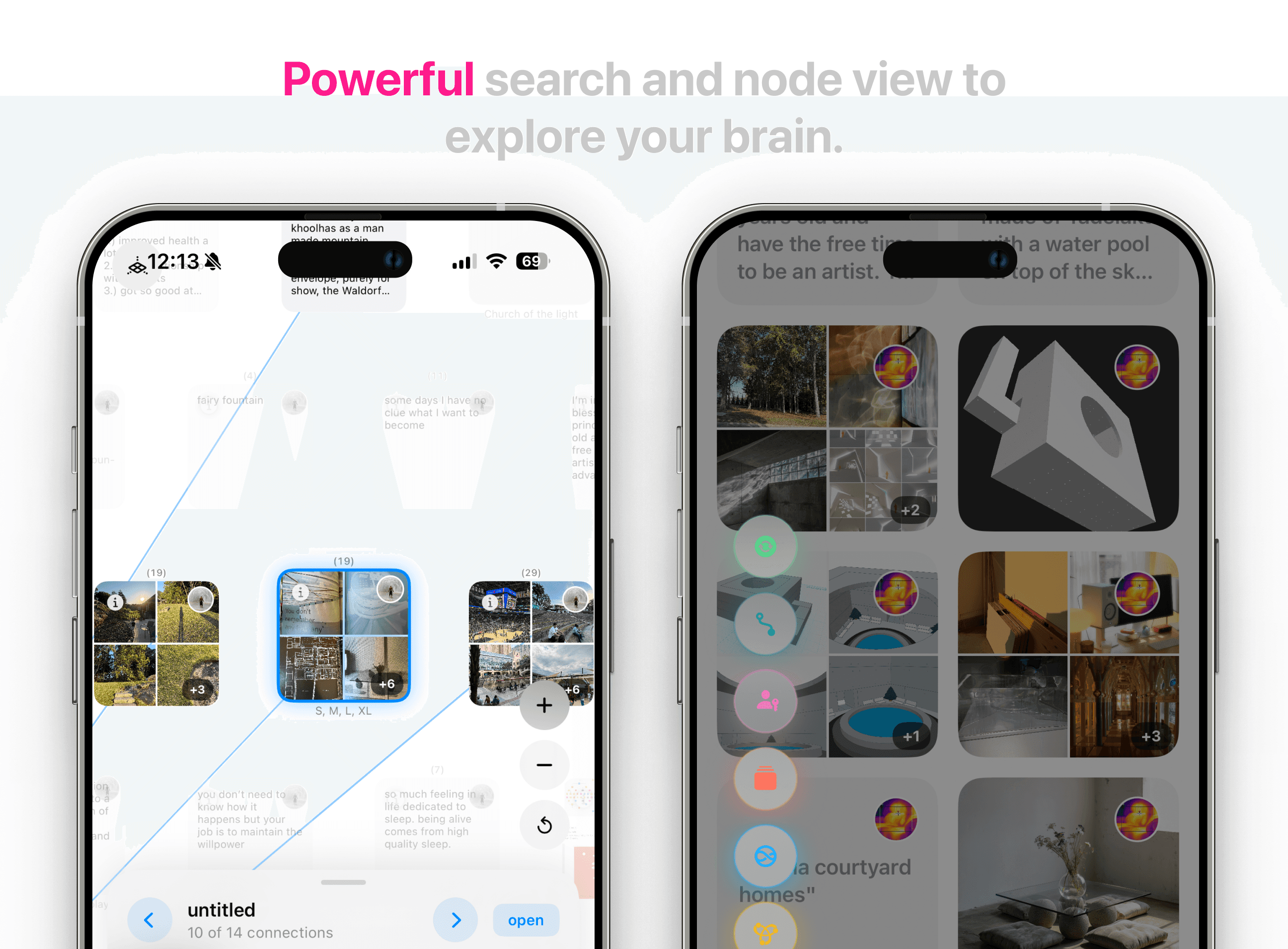
At its core, it's a semantic archive. Instead of rigid folders, your content lives as nodes on a map, linked by meaning rather than hierarchy. Powered by embeddings, search works by concept and association the way memory does — so you can pull up everything that feels related to an idea, not just things that share a keyword. It's multimodal by design: images, text, links, and references all coexist in the same space.
But archiving is only half of it. The thing that makes Hyperworld more than a prettier Pinterest is the layer of creative tools on top — small, embedded mini-apps that help you move from idea to production without leaving your library. Think Brian Eno's Oblique Strategies and the other little unblocking tools you've built and leaned on over the years, now woven directly into the place where your references already live. The goal is one continuous creative flow: capture, connect, get unstuck, make.
It's built for the people who feel the disparate-archiving problem most acutely — educators, students, researchers, and creatives — anyone whose work depends on collecting fragments and synthesizing them into something new. The ambition is to be the ultimate archival app: a digital twin for your brain, embossed with tools that turn what you've gathered into what you make next.
Remember that list of everything a "simple" notes app gets wrong? Here's what we built instead.
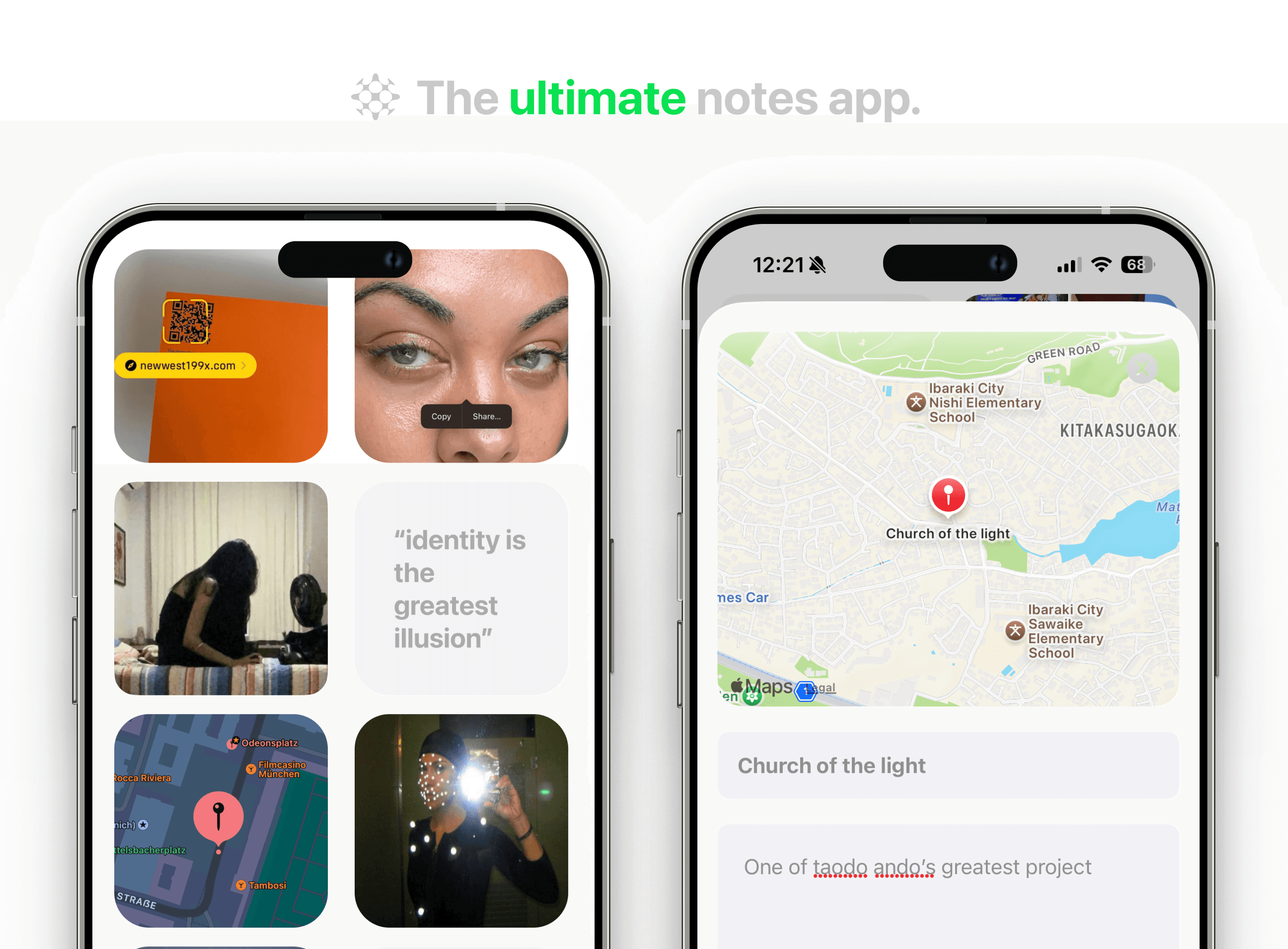
Rich Media Support - we support all types of media including:
PDFs
3D files (obj, stl)
Multi-image/video
Text
Maps
Hyperlinks with Rich links support
Audio Recording/mp3 upload
Auto-Embedding - your posts get automatically scanned for "tags" and our smart AI system understands your media and assigns tags to it for you. Less time spent sorting, and more time spent discovering. Don't worry, you can always add your own tags as well.
Import - Pull your notes in from Apple Notes or Obsidian so you can maintain one vault.
Node View (beta) - with our auto-embed feature, your posts are also dynamically sorted into a node graph based on similarities between notes. Beautifully swipe between connected media to view a digitized map of your brain.
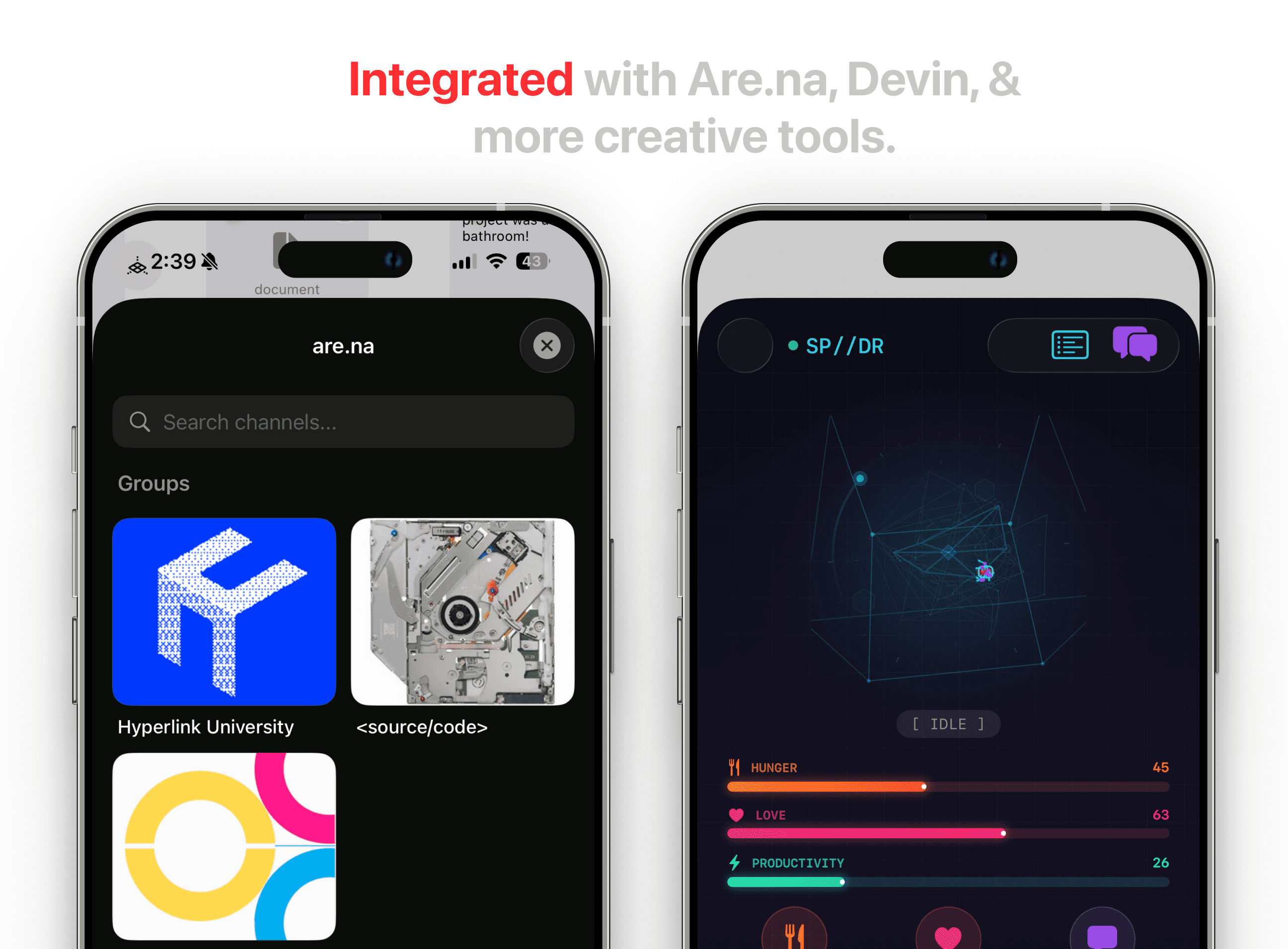
Micro-Apps - V1 features a series of micro-apps to help you go from idea to production from one place. No more referencing your notes and having 100 browsers open. In the future we will have an "applet store" for users to install & release small custom apps.
V1 includes:
Devin for AI/software prototyping
Midjourney (requires API) & NanaBanana (free) for image generation
Dex to store movies, books, & restaurants
Brian Eno's Oblique Strategies for a creative block
Are.na Explorer to easily search and reference your are.na channels
Swatch to store color palettes
Note: Some micro-apps will require you to obtain your own API keys.
Folders - Folders, nested folders, you name it - total creative freedom.

V1.1 Live now - download today.
prologue
After reading Ted Nelson's Computer Lib / Dream Machines, I found myself wanting a notes app that didn't yet exist — something leagues beyond what was available. I was tired of the tools I had, always jumping across 5 different notes apps to capture my brain's dumps. I wanted one thing that could be a creative drafting space, a reference library, and a notebook all at once. Over time, that want grew into something larger: a creative everything app.
Ted Nelson's hypertext dream was bigger and stranger than the web we ended up with. He coined the word "hypertext" in the 1960s and spent decades chasing it through Project Xanadu — a vision of all human writing woven into a single, deeply interconnected document space.
A few ideas made it radical. Links were meant to be two-way: you'd always know not just where a document pointed, but who pointed back at it, so connections were visible from both ends. Nothing would ever break or disappear — every version of every document preserved, no 404s, no link rot. Instead of copying and pasting, you'd use transclusion: quoting a source meant pulling in the living original by reference, so it stayed connected to where it came from, with attribution intact. And baked into all of it was a payment layer — every time your words were transcluded or quoted, you'd automatically earn a tiny royalty. Authorship and economics were part of the architecture, not an afterthought.
What we got instead was Tim Berners-Lee's World Wide Web — and it won precisely because it was simpler. Links are one-way, so you link out into the void and never know who's linking back. They break constantly; the web forgets. There's no transclusion, just endless copy-paste that severs content from its source and turns attribution into a manual chore. There's no native way to pay creators, which is a big reason the web drifted toward ads, paywalls, and walled platforms — the opposite of Nelson's open, universal fabric. Connections became invisible jumps: you click, you teleport, you lose the context.
The irony is that Nelson's richness is what made Xanadu nearly impossible to ship, while Berners-Lee's "good enough" compromises are exactly what let the web scale. But a lot of what people are reaching for now — backlinks, knowledge graphs, citation-aware tools, things that hold onto where an idea came from — are quiet attempts to win back pieces of the dream the web left on the floor.
Most notes apps retreat into simplicity — not because simplicity serves you better, but because the alternative is hard. Building a system flexible enough to hold many workflows at once, without collapsing into a mess, takes painstaking design work that most teams never commit to. So they ship the lowest common denominator and call it minimalism. Unable to pin down the exact combination of features that would make a notes app feel alive, they settle. And "simple," in practice, tends to mean:
No rich media support
Weak search
No automatic linking between pieces of media
No connection to the tools you already use
And rarely, a UI worth returning to
What I'm building is a different kind of notes app — one designed around immersive media, intelligent use of AI, and the conviction that a tool you touch every day should be a small daily delight. The complexity is the point; the work was in making it feel effortless.
I've been building it slowly for more than three years. It took time, and I won't pretend otherwise. Life got in the way. Sometimes I got in my own way. But I'm proud of what it's become. It's the best app I've ever used.
A special thanks to the many friends whose ideas, designs, and gentle hands have quietly guided this project over the years.
Day 1
It started with something that had nothing to do with an app.
I'd founded a little digital academy called Hyperlink University — HPLU — for kids who wanted to take an active approach to learning. The idea was simple: use the free resources already scattered across the internet, build your own capstones and projects, and you can teach yourself almost anything. The community grew faster than I expected. And the more it grew, the more obvious it became that we needed somewhere to actually talk and share the boundless pile of resources we were all accumulating.
The problem was that link sharing, everywhere, was broken. You'd drop a URL into a chat and it would collapse into a gray rectangle, stripped of everything that made it worth sharing. So the very first version of this app started there — a rich, links-integrated platform where our community could share what they were finding and archiving online.
Then the requests started. Can I post a PDF? What about a video? An image set? A song? One by one we added media types until, eventually, we handled basically everything. And somewhere in that process, a thought struck me that I couldn't put down:
Why couldn't a notes app be social?
I get thousands of notifications on are.na about what my friends are archiving — what they're looking at, collecting, obsessing over. There's something quietly thrilling about it. Of course, some things are meant to be private. But the rest is the digital version of seeing someone at the library. You catch a glimpse of what a friend is deep in, and it sparks a curiosity in you. It makes you a little better at the end of the day.
So we built a prototype to test the feeling — Pixel Park. A simple, open website where anyone could post a link and randomly browse a library of curated media. No accounts, no friction, just a window into what people were saving. It was rough, but the feeling was there. I started dreaming about everyone who could use something like this — educators, researchers, creatives, the kid three states over teaching herself animation at midnight.
early day scribbles (2024)
HPLU (2024)
Pixel Park gave us enough conviction to build the real thing. We turned HPLU into a proper app, packed with goodies — including, in the earliest versions, a PictoChat lifted straight out of the Nintendo DS, so people could doodle and chat with each other each day. It was playful. People liked it. For a while it felt like we'd found it.
But the longer I lived inside the app, the more something nagged at me. It was too social. The links, the sharing, the chat — it had all become the main event, and the actual act of saving something for yourself had quietly become a chore you did on the way to posting. That was backwards. I didn't want a social network with a notes app bolted on. I wanted a place to archive my own world, where the social part emerged naturally — as a byproduct of archiving, not a second job stacked on top of it.
That realization was big enough that I decided to start over.
Project X
I named the restart Project X, after Ted Nelson's Project Xanadu — the original dream of hypertext, the one that was supposed to connect everything to everything. It felt right to circle back to where the whole obsession began.
This time the order of operations was inverted. Archiving first. Everything else second.
And then came the long middle — the part nobody writes about, because it's mostly just doing the work. I explored more designs and directions than I can count. Some weeks I'd rebuild a single screen four times over. I taught myself things I had no business learning to teach myself. The app changed shape again and again. Life kept happening in the background — the way it does — and there were long stretches where I barely touched it. I'd come back, look at where I'd left off, and keep building toward the thing I knew it could be.
It took about two and a half years of that. A lot of learning, a lot of starting-over, a lot of nights. But slowly, the everything-app I'd been chasing since that Ted Nelson book started to actually exist.
And it finally had the right name.
field book
I introduce field book - a new way to archive the internet.
"A field book is what a naturalist carries into the wild: a place to press a leaf, sketch a bird, jot a coordinate, note the weather. You record what you encounter as you encounter it, and the sorting and connecting comes later. That's exactly what this is. You go out into the strange wilderness of the internet, you bring back specimens, and field book quietly catalogs them for you."
Hyperworld is a connected digital library for your mind — a place where everything you save, collect, and reference can finally live together and talk to each other. Today your creative inputs are scattered: a Twitter bookmark here, an are.na image there, a screenshot buried in your camera roll, a PDF in some folder you'll never open again. The only place those things actually connect is in your head, or temporarily on a moodboard. Hyperworld is built to capture that connective tissue and make it permanent, searchable, and shared.
At its core, it's a semantic archive. Instead of rigid folders, your content lives as nodes on a map, linked by meaning rather than hierarchy. Powered by embeddings, search works by concept and association the way memory does — so you can pull up everything that feels related to an idea, not just things that share a keyword. It's multimodal by design: images, text, links, and references all coexist in the same space.
But archiving is only half of it. The thing that makes Hyperworld more than a prettier Pinterest is the layer of creative tools on top — small, embedded mini-apps that help you move from idea to production without leaving your library. Think Brian Eno's Oblique Strategies and the other little unblocking tools you've built and leaned on over the years, now woven directly into the place where your references already live. The goal is one continuous creative flow: capture, connect, get unstuck, make.
It's built for the people who feel the disparate-archiving problem most acutely — educators, students, researchers, and creatives — anyone whose work depends on collecting fragments and synthesizing them into something new. The ambition is to be the ultimate archival app: a digital twin for your brain, embossed with tools that turn what you've gathered into what you make next.
Remember that list of everything a "simple" notes app gets wrong? Here's what we built instead.
Rich Media Support - we support all types of media including:
PDFs
3D files (obj, stl)
Multi-image/video
Text
Maps
Hyperlinks with Rich links support
Audio Recording/mp3 upload
Auto-Embedding - your posts get automatically scanned for "tags" and our smart AI system understands your media and assigns tags to it for you. Less time spent sorting, and more time spent discovering. Don't worry, you can always add your own tags as well.
Import - Pull your notes in from Apple Notes or Obsidian so you can maintain one vault.
Node View (beta) - with our auto-embed feature, your posts are also dynamically sorted into a node graph based on similarities between notes. Beautifully swipe between connected media to view a digitized map of your brain.
Micro-Apps - V1 features a series of micro-apps to help you go from idea to production from one place. No more referencing your notes and having 100 browsers open. In the future we will have an "applet store" for users to install & release small custom apps.
V1 includes:
Devin for AI/software prototyping
Midjourney (requires API) & NanaBanana (free) for image generation
Dex to store movies, books, & restaurants
Brian Eno's Oblique Strategies for a creative block
Are.na Explorer to easily search and reference your are.na channels
Swatch to store color palettes
Note: Some micro-apps will require you to obtain your own API keys.
Folders - Folders, nested folders, you name it - total creative freedom.